 Admin Drey
A HowToShareTips Search Trends Report: www.howtosharetips.com
Nigeria is one of Africa’s largest iPhone markets, driven by a thriving “UK-used” and “US-used” resale trade, a growing middle class buying new devices, and one of the continent’s most active phone-repair economies (Computer Village in Lagos, Wuse in Abuja, and similar markets in Port Harcourt and Kano). That combination, imported secondhand devices, patchy network infrastructure, Naira volatility, and a large repair-and-resale ecosystem, produces a very distinct pattern of iPhone-related search behavior compared to the US or UK.
This report breaks down the 50 problems Nigerian iPhone users most frequently search for on Google, organized into nine categories, along with practical solutions, search-trend charts, and recommendations from repair technicians and mobile analysts.
A note on methodology: The figures and charts below are editorial estimates. They are modeled from patterns across repair-shop reports, tech-support forums (Nairaland’s Phones section, Reddit, Apple Support Communities), 2025–2026 troubleshooting coverage, and known Nigeria-specific buying behavior, not a raw export from Google’s internal keyword-volume tools. Treat the percentages as directional (which problems are bigger than others) rather than exact figures.
Search Trend Analysis
Three forces shape what Nigerians search for that don’t apply the same way in markets where most iPhones are bought new, sealed, and on contract:
- The used-phone pipeline. A large share of iPhones sold in Nigeria arrive as “UK-used” or “US-used” units, previously owned devices reset and resold. This drives huge search volume around iCloud Activation Lock, IMEI/blacklist checks, and “how to know if an iPhone is clean before buying.”
- The eSIM shift. Since the iPhone 14 line, US-market iPhones ship without a physical SIM tray, relying only on eSIM. Many of these units end up in Nigeria through resale channels, and buyers are frequently blindsided when they can’t insert a local MTN, Glo, Airtel, or 9mobile SIM.
- Naira and infrastructure pressure. A weaker Naira makes repairs and genuine parts more expensive, pushing people toward search terms about counterfeit parts, price checks, and “affordable repair near me.” Frequent power fluctuations also increase battery- and charging-related searches, since users rely more heavily on generators, inverters, and inconsistent charging sources.
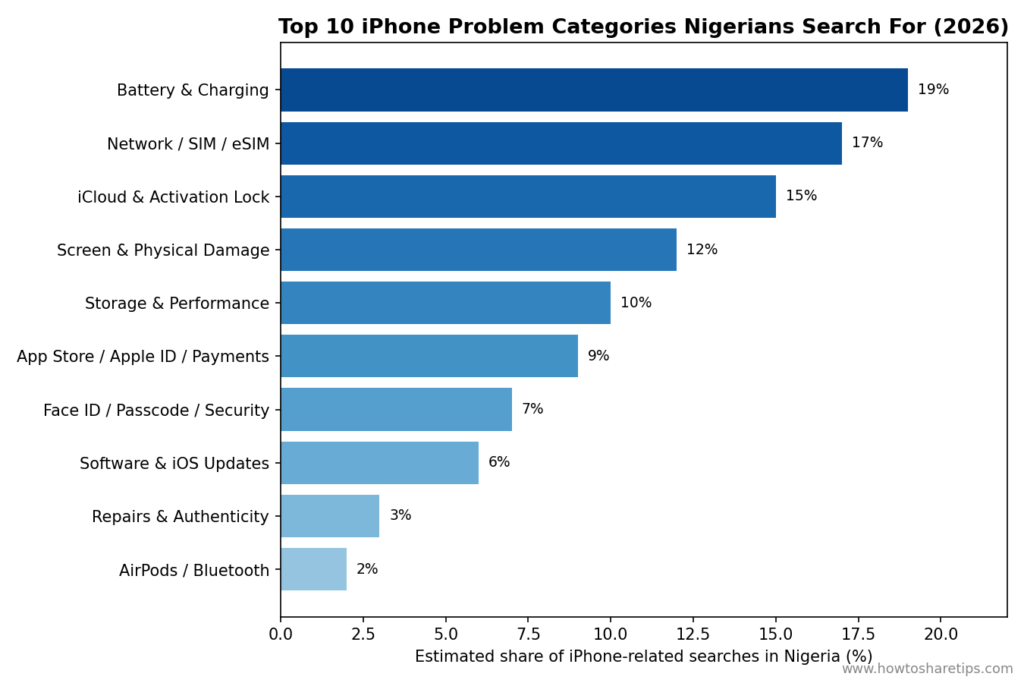
Battery and charging issues remain the single biggest category, but network/SIM and iCloud/used-phone concerns are close behind, a pattern rarely seen at this scale in markets dominated by new-device sales.
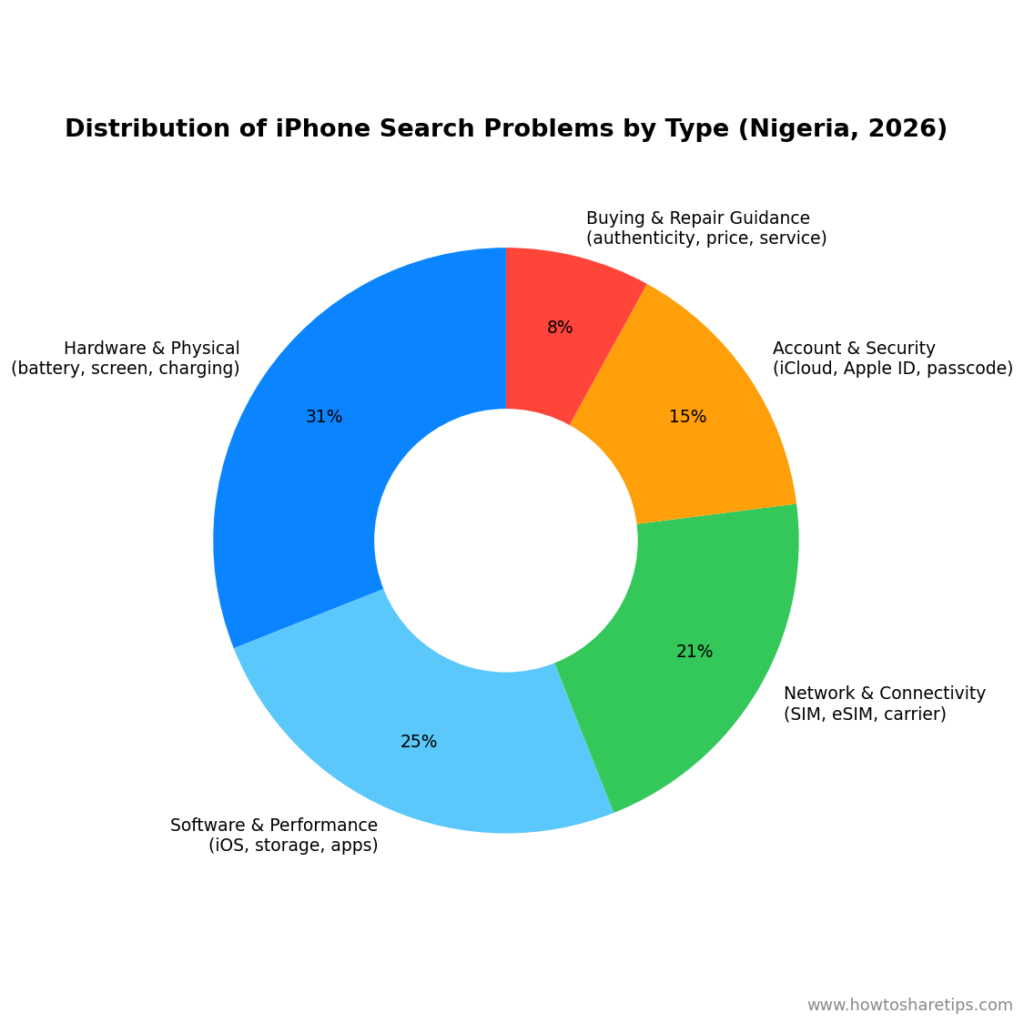
Grouped broadly, hardware and physical issues (battery, screen, charging) still lead, but “account and security” and “network and connectivity” searches, categories tied directly to Nigeria’s used-import market, together make up more than a third of all iPhone-related search activity.
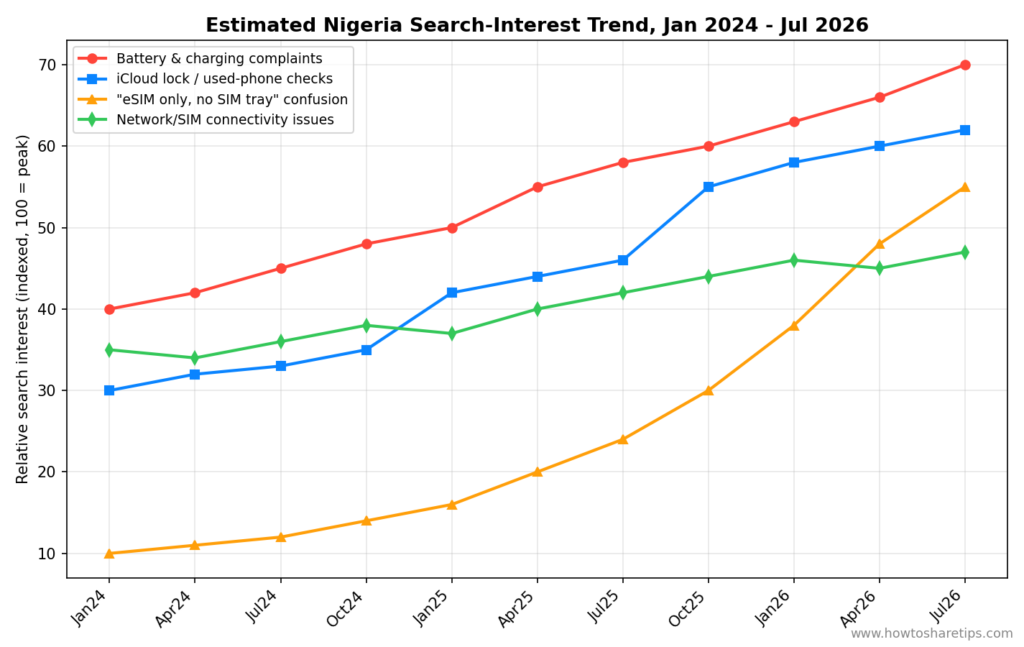
The clearest 2024–2026 trendline is the rise of “eSIM only, no SIM tray” confusion, which has grown faster than any other theme as more US-spec iPhone 14/15/16/17 units without a SIM slot enter the resale market. iCloud-lock and used-phone verification searches spiked around late 2025, coinciding with reports of an uptick in Activation-Lock scams on secondhand units.
The Top 50 Problems and Solutions
A. Battery & Charging (7)
1. iPhone battery draining fast Check Settings → Battery for the apps consuming the most power, disable Background App Refresh for heavy apps, and check Battery Health. A Maximum Capacity below 80% usually means the battery itself needs replacing.
2. iPhone not charging or charging slowly Try a different Apple-certified (or MFi-certified) cable and adapter first, counterfeit cables are extremely common in Nigerian markets and are a leading cause of this complaint. If a certified cable still won’t charge the phone, inspect the charging port for lint or debris, and if that doesn’t help, the port or battery likely needs professional repair.
3. iPhone overheating while charging or gaming Remove thick cases while charging, avoid gaming during a charge cycle, and close background apps. Persistent overheating during normal, light use can point to a battery or logic-board problem that needs a technician’s diagnosis.
4. Battery health showing below 80% This is a normal sign of battery aging, not a defect. Apple’s official replacement path is the most reliable option; independent shops can be cheaper but battery quality varies significantly, so ask specifically for a genuine or high-grade cell.
5. Battery percentage jumping (e.g., 80% to 20% suddenly) This is almost always a battery-health/calibration issue. A full charge-to-100%-then-drain cycle can sometimes recalibrate the reading, but a jump this large usually means the battery needs replacing.
6. Phone shutting down unexpectedly above 20% Similar root cause to #5, an aged battery struggling to deliver current under load, especially in cold or hot conditions. Replacement resolves it in most cases.
7. Best charger/power bank for iPhone in Nigeria Stick to MFi-certified accessories. Counterfeit chargers are one of the most common causes of both slow charging and long-term battery damage in the Nigerian market, and using cheap, uncertified fast-chargers can also degrade battery health faster than normal.
B. Network, SIM & Carrier Connectivity (8)
8. iPhone showing “No Service” after inserting a local SIM Restart the device, toggle Airplane Mode, and update carrier settings (Settings → General → About should prompt automatically if one is available). If it persists, reset network settings under Settings → General → Transfer or Reset iPhone.
9. “eSIM only” iPhones with no physical SIM tray This affects buyers of US-spec iPhone 14 and later models. The fix isn’t a repair, it’s setting up an eSIM. MTN, Glo, Airtel, and 9mobile all support eSIM provisioning; ask your carrier’s shop for an eSIM QR code, or convert an existing physical SIM to an eSIM through the carrier’s self-service channel where available.
10. iPhone showing “SOS Only” Common after an iOS update or when moving between Wi-Fi and cellular. Toggle Airplane Mode, restart, update to the latest iOS build, and if that fails, reset network settings, this clears saved Wi-Fi passwords, so back those up mentally first.
11. iPhone not connecting to 4G/5G properly in Nigeria Confirm the specific iPhone model actually supports the LTE/5G bands used by your carrier, this matters most for imported or older units. Check Settings → Cellular → Cellular Data Options, ensure “4G”/”5G” and VoLTE/VoNR are enabled, and try a manual carrier network selection.
12. NIN-SIM linkage causing “Invalid SIM” or line deactivation This is a regulatory issue, not a phone fault. Confirm your NIN is linked with your carrier via their USSD code or app, since unlinked or improperly linked lines can be deactivated regardless of which phone you use.
13. iPhone network-locked to a foreign carrier Check lock status under Settings → General → About (“No SIM restrictions” means it’s unlocked). If locked, the original carrier (not a third-party “unlock service”) is the only legitimate path, be very wary of paid “instant IMEI unlock” services, which are frequently scams or short-lived exploits that break with the next iOS update.
14. Slow or no mobile data despite full signal bars Check for a data cap or throttling from the carrier, confirm APN settings are correct, and try resetting network settings. Full bars reflect voice/cellular signal strength, not guaranteed data throughput.
15. How to check if an iPhone supports Nigerian network bands before buying Look up the exact model number on a specs database (e.g., GSMArena) and compare supported LTE/5G bands against MTN, Glo, Airtel, or 9mobile’s published bands, this is the one compatibility problem that can’t be fixed after purchase.
C. iCloud, Activation Lock & Used-Phone Issues (7)
16. iCloud Activation Lock on a “UK-used” or “US-used” iPhone This is arguably the most Nigeria-specific search theme on this list. If the phone is still linked to a previous owner’s Apple ID, it cannot be legitimately unlocked without that owner’s credentials or Apple’s official recovery process (proof of purchase plus identity verification). Paid “iCloud bypass” services almost always fail, use unstable exploits, or are outright scams.
17. Find My iPhone stuck showing the previous owner’s device Ask the seller to remove the device from their Apple ID and iCloud.com’s Find My Devices list before completing a purchase, this single step prevents most Activation Lock disputes after the fact.
18. How to check if an iPhone is “iCloud clean” before buying Power the phone on, and if it asks for an Apple ID and password during setup that the seller cannot supply, it’s locked. Never rely solely on a seller’s verbal assurance, insist on watching the phone go through setup in person.
19. iPhone stuck asking for Apple ID verification after purchase Contact the seller immediately for the credentials; if unreachable, this typically indicates the device was not properly cleared and should be returned.
20. IMEI blacklist / stolen iPhone check Dial *#06# to get the IMEI, then check it against a GSMA blacklist checker or the carrier before buying secondhand, a blacklisted IMEI can leave you with a phone that can’t get network service at all.
21. Forgotten Apple ID password Use iforgot.apple.com or the “Forgot password” flow on another Apple device; if two-factor recovery contacts are outdated, Apple’s official account-recovery process is the only reliable route, avoid third-party “Apple ID recovery” tools.
22. “UK-used” vs “US-used” vs new iPhone confusion These are simply grading terms for the phone’s market of origin and cosmetic condition, they say nothing about the iPhone’s software region or eSIM/SIM configuration. Always separately verify network-lock status, iCloud status, and physical SIM support regardless of the “used” grade advertised.
D. Storage & Performance (5)
23. iPhone storage almost full Settings → General → iPhone Storage shows what’s consuming space. Offloading unused apps, clearing large chat-app caches (WhatsApp media is a common culprit), and moving photos to iCloud or a computer usually frees up significant room.
24. iPhone lagging or freezing after an iOS update Often resolves within a day or two as the device finishes background indexing after a major update. A force restart, or updating to the next point release, fixes most residual cases.
25. Apps crashing repeatedly Usually a software, not hardware, issue, update the app, and if that fails, delete and reinstall it. A device restart resolves many temporary glitches as well.
26. iPhone stuck on the Apple logo (boot loop) Try a force restart first (the exact button sequence varies by model). If it persists, a restore via Finder/iTunes in recovery mode is the next step, DFU mode restore is the last resort before professional repair, and both can erase data if there’s no recent backup.
27. Photos or videos not backing up to iCloud Check available iCloud storage first, a full iCloud plan silently stops backups. Confirm Wi-Fi is connected and iCloud Photos is enabled under Settings → [your name] → iCloud → Photos.
E. Screen, Display & Physical Damage (6)
28. Cracked screen replacement cost in Nigeria Costs vary widely by model and by whether the shop uses genuine, OEM-equivalent, or aftermarket glass, always ask which grade of part is being used, since aftermarket screens can affect True Tone, Face ID, or touch sensitivity.
29. iPhone screen unresponsive or “ghost touch” Restart the device and remove any screen protector, which can sometimes interfere with touch sensitivity. If the issue continues, the digitizer likely needs replacement.
30. Black screen of death Force restart first. If the phone still vibrates or makes sound but the screen stays black, the display itself (not the software) usually needs replacing.
31. Water damage after rain, generator splash, or spills Power the phone off immediately, do not charge it, and avoid heat sources like hair dryers, which can worsen internal corrosion. Professional inspection and cleaning as soon as possible gives the best chance of recovery, since most warranties exclude liquid damage anyway.
32. Original vs counterfeit replacement screens and parts Ask repair shops directly whether they use genuine Apple parts, OEM-pull parts, or aftermarket parts, and get it in writing, this is one of the most common sources of buyer regret in Nigeria’s repair market.
33. Green lines or flickering on the display Usually a hardware fault in the display panel or its connector, sometimes triggered by a drop. This typically requires a screen replacement rather than a software fix.
F. Face ID, Passcode & Security (3)
34. Face ID not working Clean the TrueDepth camera area with a soft cloth, then reset Face ID under Settings → Face ID & Passcode. If it still fails, especially after a drop or water exposure, the TrueDepth sensor may be physically damaged.
35. Forgotten iPhone passcode Use “Erase iPhone” via Find My (if enabled) or restore through Finder/iTunes in recovery mode. Without a recent backup, this will erase all data, a strong argument for keeping automatic iCloud or computer backups running.
36. Touch ID / fingerprint not recognized (older models) Re-register the fingerprint under Settings → Touch ID & Passcode, ensure the finger and sensor are clean and dry, and restart the device if recognition remains inconsistent.
G. App Store, Apple ID & Payments (5)
37. Can’t add a Nigerian debit or credit card to Apple ID Apple’s payment system is picky about card type and billing-address match. Some Nigerian-issued cards aren’t supported for Apple ID billing at all; Apple Gift Cards (bought locally or via reputable resellers) are the most reliable workaround for buying apps or storage.
38. Apple ID region locked to the US or UK, can’t download Nigeria-relevant apps This usually happens with Apple IDs originally created abroad or by a previous owner. Changing the Apple ID country/region under Settings → [your name] → Media & Purchases is possible, but any existing paid apps, subscriptions, or gift-card balances tied to the old region may be forfeited, check Apple’s current terms before switching.
39. Apple Pay not available in Nigeria Apple Pay isn’t officially supported for Nigerian-issued cards yet, so this isn’t a bug to troubleshoot, it’s a market-availability limitation. Users typically rely on regular card or bank-app payments instead.
40. App Store showing “This item is temporarily unavailable” Usually tied to an Apple ID region mismatch or a payment-method problem. Signing out and back into the Apple ID, or updating the payment method, resolves most cases.
41. Changing Apple ID country/region without losing purchases Redeem or use up existing balances and check active subscriptions before switching region, since Apple explicitly warns that some content and payment methods don’t transfer across regions.
H. Software & iOS Updates (4)
42. iOS update stuck or failing to install Ensure there’s enough free storage (large updates can need several GB temporarily), a stable Wi-Fi connection, and sufficient battery or a charger connected. A force restart followed by retrying the update resolves most stalls.
43. iPhone won’t update due to insufficient storage Temporarily offloading large apps, photos, or videos (after backing them up) usually frees enough space; Apple’s software update process also briefly needs extra room to stage the download.
44. WhatsApp, Instagram, or Mail notifications arriving late or only after unlocking This has been a recurring complaint after recent iOS releases. Check that Background App Refresh and notification permissions are enabled for the app, and keep iOS updated to the latest point release, since Apple has pushed incremental fixes for exactly this issue.
45. Keyboard lag or typing accuracy problems after an update This was a widely reported issue that Apple specifically addressed in a recent iOS point release. If typing still feels laggy, restart the device and confirm you’re on the newest available iOS build.
READ MORE: IPhone Not Charging? Here’s How to Fix It Fast
I. Repairs, Authenticity & Buying Guidance (5)
46. How to spot a fake or heavily refurbished iPhone at Computer Village, Alaba, or similar markets Check the Settings → General → About screen for model number and compare it against Apple’s official specs; inspect for mismatched screws, non-genuine parts warnings (recent iOS versions flag some non-genuine parts), and always verify IMEI and iCloud status before paying.
47. Best place to repair an iPhone in Lagos, Abuja, or Port Harcourt There’s no universal “best,” but reputable shops will be transparent about whether parts are genuine, OEM-equivalent, or aftermarket, and will offer some form of warranty on the repair, treat a refusal to specify part quality as a red flag.
48. iPhone price in Naira today Prices track the dollar/Naira exchange rate closely and shift often; checking a current, reputable price list or marketplace on the day of purchase is more reliable than relying on remembered prices from even a few weeks earlier.
49. How to check if a charger or cable is genuine Genuine Apple/MFi accessories carry specific certification markings and tend to feel noticeably more solid than counterfeits; buying from Apple-authorized resellers is the safest way to avoid the fakes that flood open markets.
50. AirPods or other Bluetooth accessories not pairing with iPhone Restart both devices, forget the device under Settings → Bluetooth and re-pair, and confirm the accessory’s own battery isn’t the actual problem, a surprisingly common cause of “pairing failures.”
READ ALSO: How to Clear Cache on iPhone to Improve Speed and Performance
Expert Recommendations
- Verify before you buy, not after. Repair technicians consistently point to iCloud status, IMEI blacklist status, and network-band compatibility as the three checks that prevent the most expensive post-purchase surprises in Nigeria’s secondhand iPhone market.
- Treat “unlocked” and “iCloud clean” as two separate questions. Carrier unlock and iCloud Activation Lock are unrelated locks with different fixes, confusing them is one of the most common mistakes buyers make.
- Budget for genuine parts, not just the cheapest repair quote. Analysts tracking the repair market note that aftermarket screens and batteries are often the root cause of a second, more expensive repair within months.
- Keep backups current before attempting any DIY fix. Several of the most common searches on this list (boot loops, forgotten passcodes, failed updates) have fixes that can erase data, a routine iCloud or computer backup turns a stressful recovery into a non-event.
- Expect the eSIM trend to keep growing. As more US-spec iPhones enter the resale pipeline, “no SIM tray” confusion is likely to keep climbing; buyers and secondhand dealers alike would benefit from clearly disclosing eSIM-only status upfront.
In Conclusion
The problems Nigerians search for around their iPhones tell a story that’s different from the rest of the world’s: less about which case to buy, and much more about verifying what you’re actually buying. Battery, screen, and storage complaints look similar to any market, but the heavy search volume around iCloud locks, network-band compatibility, eSIM confusion, and counterfeit parts reflects Nigeria’s specific mix of a large used-import market, multiple mobile carriers, and a thriving independent repair sector.
For buyers, sellers, and repair shops alike, the throughline across all 50 problems is the same: verify status (iCloud, IMEI, network lock, part authenticity) before money changes hands, and keep backups current so that the inevitable software hiccup is an inconvenience rather than a crisis.
— HowToShareTips Research Desk


 How To Share Tips